

GoHighLevel CRM Setup: Pipelines, Tags & Custom Fields Guide
A GoHighLevel account can look impressive and still be hard to use. Contacts pile up with no clear status, nobody is sure which leads need a reply, and reports don't match what is really happening in the business. In most cases the platform isn't the problem. The CRM was never structured around how the business actually sells.
This guide walks through GoHighLevel CRM setup in the order that tends to work best: your pipeline, your tags, your custom fields, and your smart lists. The examples are written for coaches, consultants, and small service businesses, but the same logic applies to most teams that sell through calls or consultations.
What a GoHighLevel CRM Does (and What It Doesn't)
The CRM is the part of GoHighLevel that stores your contacts and tracks your opportunities, which are potential sales moving through a pipeline. Every form submission, booked call, text, and email can be attached to a contact record, so you see the whole history in one place.
What it doesn't do is organise itself. A CRM only reflects the structure you give it. If your pipeline stages are vague and your tags are inconsistent, you get messy data no matter how good the software is. That is why setup comes before automation: workflows are only as reliable as the pipeline stages and tags they depend on.
Before You Open Settings: Map Your Sales Process
Spend ten minutes on paper first. Write down what happens between a stranger finding you and becoming a paying client. A typical path for a coach might be:
- Someone fills out a form or books a discovery call.
- You confirm and prepare for the call.
- The call happens, or the person doesn't show up.
- You send a proposal or next steps.
- They say yes, say no, or go quiet.
Your pipeline should mirror this real sequence. If you skip this step, you end up copying a generic template that doesn't fit your business.
Step 1: Build a Pipeline That Matches How You Sell
In GoHighLevel, a pipeline is a set of stages that an opportunity moves through. Each lead that is worth following up becomes an opportunity in one of those stages.
An example pipeline for a coach
Here is a simple five-stage structure you can adapt:
- New Lead: they have enquired but nobody has responded yet.
- Contacted: you have replied or tried to reach them.
- Call Booked: a discovery call is on the calendar.
- Call Completed: the call took place.
- Proposal Sent: they have received your offer and are deciding.
Finished opportunities are marked as Won or Lost rather than sitting in a stage forever. GoHighLevel also has an Abandoned status for leads that simply stop responding, which is useful for keeping your board honest.
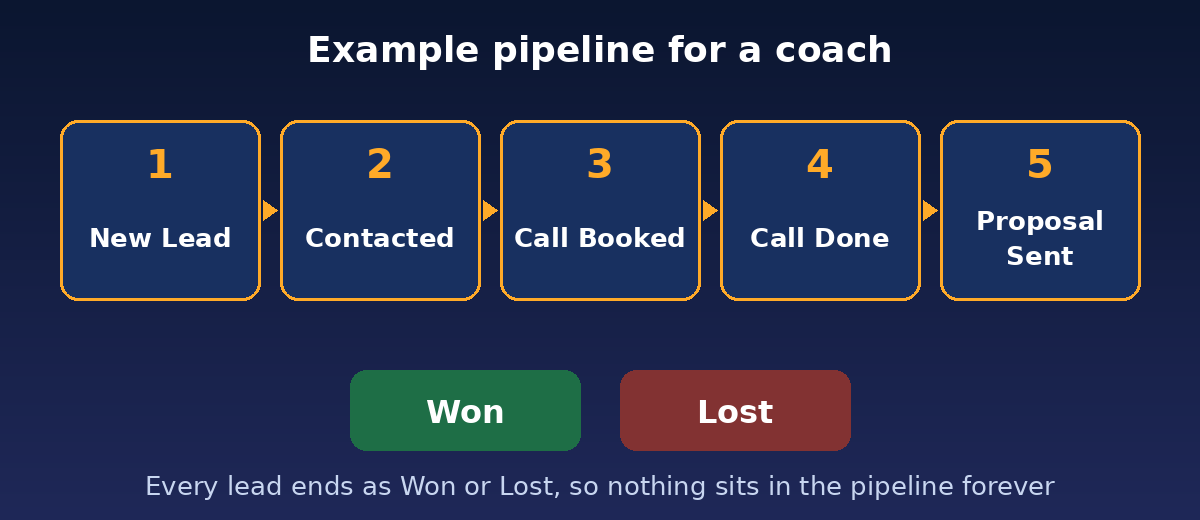
An example five-stage pipeline for a coach, ending in Won or Lost.
Rules that keep a pipeline useful
- Fewer stages beat more stages. If your team can't explain the difference between two stages in one sentence, merge them.
- Each stage needs a clear entry rule. For example, "Call Booked" means a calendar appointment exists, nothing less.
- Name stages for what happened, not what you hope will happen. This keeps reporting accurate.
- Use separate pipelines for separate offers. A one-to-one coaching programme and a group course usually have different sales cycles.
Step 2: Create a Tag System You Can Maintain
Tags are labels you attach to contacts. They are quick to create, which is exactly why they get out of hand. Without a naming system, you end up with "lead", "Lead", "new lead", and "leads-2025" all meaning the same thing.
Use prefixes to group tags
A simple fix is to start every tag with a category prefix:
- status: where the person stands, such as lead, client, or past-client
- source: how they found you, such as website, referral, or instagram
- interest: what they asked about, such as funnels, crm-setup, or automation
- behavior: what they did, such as booked-call, no-show, or proposal-sent
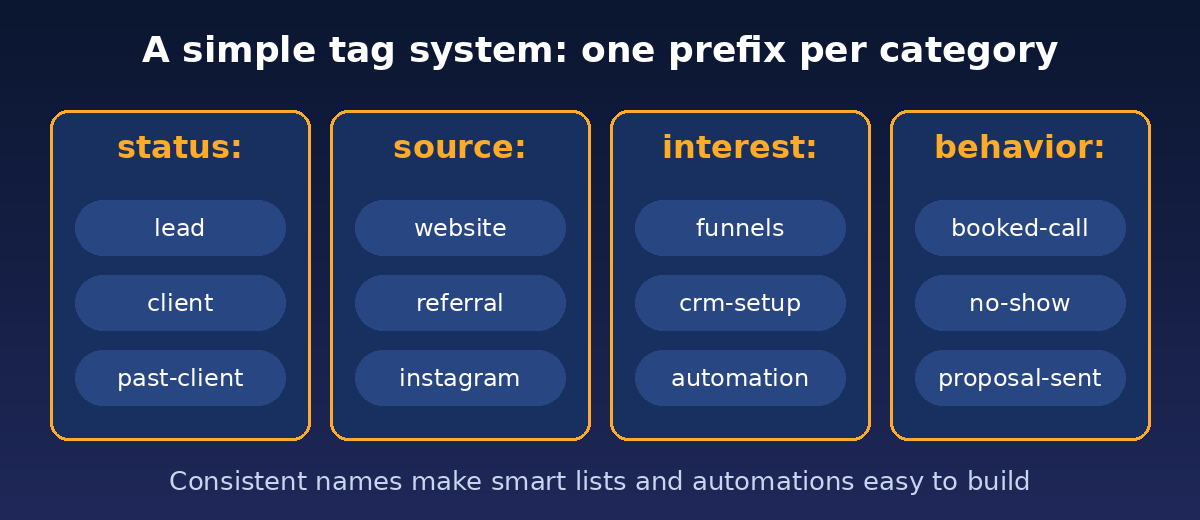
One prefix per category keeps tags consistent and easy to filter.
Because tags often trigger automations, a tidy naming scheme also makes workflows easier to build and less likely to fire for the wrong people. Decide the list once, write it down, and share it with everyone who touches the CRM.
Tags describe, pipelines track progress
A common mistake is using tags to track sales progress. Keep progress in the pipeline stage and use tags for facts about the person, such as where they came from. Mixing the two means you track the same thing in two places and they drift apart.
Step 3: Add Custom Fields for the Data You Really Use
Default fields cover the basics: name, email, phone. Custom fields let you store details specific to your business, such as the service someone is interested in, their budget range, or the date of their last session.
What to collect
Ask yourself one question for every field: will we use this to make a decision or send a better message? If the answer is no, don't create it. Useful examples include:
- Main goal or problem: so you can personalise follow-up and prepare for calls
- Service interested in: helps route leads to the right pipeline or offer
- Budget range or timeline: helps you prioritise strong-fit leads
- Lead source detail: the specific campaign or page, not just "website"
Contact fields and opportunity fields
Contact fields stay with the person, while opportunity fields belong to a particular deal. If someone buys twice, the second deal can have its own value and details without overwriting the first. Put information about the person on the contact, and information about a specific sale on the opportunity.
Step 4: Turn Your Data Into Smart Lists
Smart lists are saved, automatically updating views of your contacts, filtered by tags, custom fields, pipeline stage, or recent activity. Instead of searching manually every morning, you open a list that already shows who needs attention. Useful ones for a small team:
- New leads not yet contacted: everyone in the first stage with no reply sent.
- Booked calls this week: helps you prepare and send reminders.
- No-shows to reschedule: contacts tagged behavior:no-show.
- Proposals waiting for an answer: opportunities in the Proposal Sent stage, oldest first.
Step 5: Connect Forms and Calendars So Data Lands Correctly
A clean structure only stays clean if new leads arrive properly. When you set up your forms and booking calendars, check three things:
- Fields map correctly. Each form question should write to the right contact field.
- New enquiries create opportunities in the first pipeline stage automatically, so nobody has to add them by hand.
- The right tags are applied on submission, including a source tag so you know where the lead came from.
Step 6: Test With a Dummy Contact
Before you send real traffic, submit your own forms using a test email and phone number. Then check that the contact appears, the opportunity lands in the correct stage, the tags are applied, and the fields are filled in. Move the opportunity through the stages and confirm any automations behave as expected. It takes a few minutes and saves a lot of cleanup later.
Common GoHighLevel CRM Setup Mistakes
- Copying someone else's pipeline. A template built for a real estate team will not suit a coach.
- Creating tags on the fly. Without rules, duplicates appear within weeks.
- Collecting fields nobody uses. Long forms reduce submissions and add clutter.
- Leaving old opportunities open. Close or mark them lost so your pipeline numbers mean something.
- Building automations before the structure is stable. Changing a stage name later can break workflows that depend on it.
- Not documenting anything. A one-page list of stages, tags, and fields makes it easy to onboard a new team member.
A Quick GoHighLevel CRM Setup Checklist
- Sales process written down
- One pipeline per offer, with clear stage rules
- Tag naming scheme decided and documented
- Custom fields limited to what you actually use
- Smart lists for daily follow-up
- Forms and calendars mapped to fields, pipeline, and tags
- Full test run with a dummy contact
When It Makes Sense to Get Help
Many small businesses can set up a basic CRM themselves. Help becomes worth considering if you are migrating from another platform, running several offers, managing a team, or discovering that your existing account is already disorganised. A good specialist will audit what you have before rebuilding anything. If you are weighing that decision, our checklist for choosing a GoHighLevel expert covers the questions worth asking.
Once your CRM structure is stable, the next step is automating follow-up. Our GoHighLevel automation guide for coaches and agencies shows the core workflows, and our guide to building funnels that follow up with every lead covers the front end that feeds your pipeline.
Frequently Asked Questions
How long does GoHighLevel CRM setup take?
A basic setup with one pipeline, a handful of tags, and a few custom fields can be done in a day or two once your process is clear. Larger setups with several pipelines, migrations, and integrations take longer.
Should I set up the CRM or the automations first?
The CRM first. Automations rely on pipeline stages, tags, and fields, so changing them afterwards can break workflows.
How many pipeline stages should I have?
Only as many as you need to describe real steps in your sales process. For many coaches and consultants, five to seven is plenty. If two stages are hard to tell apart, combine them.
Can I move my contacts from another CRM into GoHighLevel?
Yes, contacts can usually be imported from a CSV file. Create your custom fields and tags before importing, so the data maps cleanly rather than ending up in notes or being lost.
Final Thoughts
A well-structured GoHighLevel CRM is simple: a pipeline that reflects how you sell, tags that follow one naming system, custom fields you actually use, and smart lists that show who needs attention today. Get that foundation right and everything built on top of it, from reminders to reports, becomes easier to trust.
If you would like a second pair of eyes on your setup, you can book a free strategy call with Funnels by Zayyan, or see examples of our work.


