
How to Automate Google Review Requests With GoHighLevel
When someone is choosing a local business, reviews are often what they look at before they call. Many happy customers never leave one simply because nobody asked, or because they meant to and forgot. An automated review request fixes that by asking at the right moment, every time, without anyone on your team having to remember.
This guide explains how to set up Google review requests in GoHighLevel, what to write, when to send it, and how to stay within the rules.
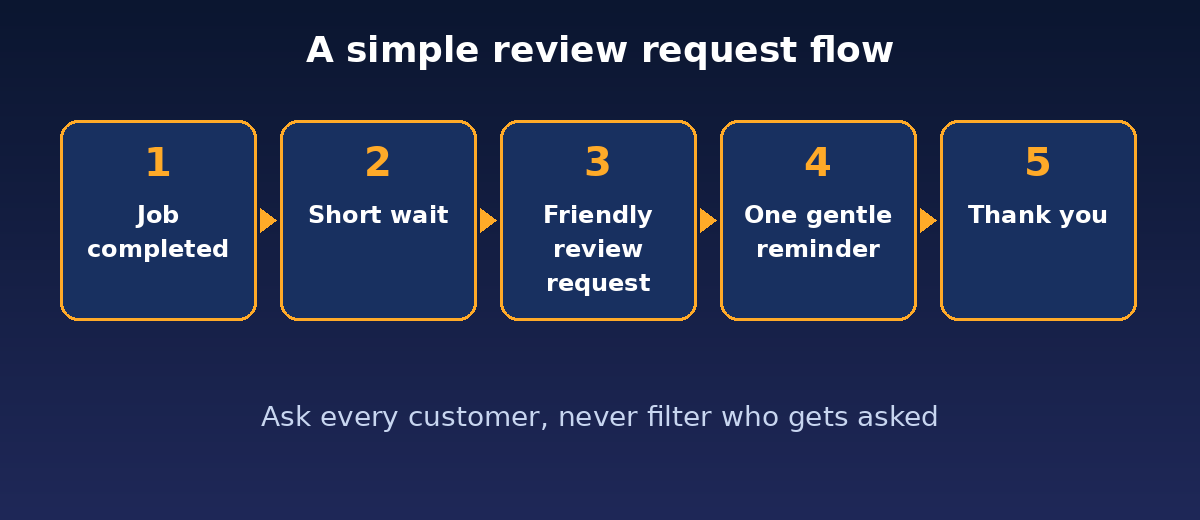
A simple flow: ask after the job, remind once, and say thank you.
Why Automate Review Requests?
Asking manually works until the day gets busy. Automation brings three benefits: it is consistent, it is timely, and it doesn't depend on someone remembering. Over time, a steady stream of recent, genuine reviews gives prospects more to go on than a handful of old ones.
Automation should never feel robotic to the customer, though. The goal is a polite, personal-sounding nudge sent at the moment they feel most positive about your work.
Know the Rules Before You Start
Review platforms have policies, and breaking them can get reviews removed or your listing penalised. As a general guide, which you should confirm against Google's current policies:
- Don't offer incentives such as discounts or gifts in exchange for reviews.
- Don't filter who you ask. Sending only happy customers to Google and unhappy ones elsewhere, sometimes called review gating, is generally discouraged. Ask everyone.
- Don't write or post reviews yourself, or ask staff and family to do so.
- Don't pressure. Asking is fine. Insisting is not.
Rules change, so check the current guidelines for the platforms you use.
Step 1: Get Your Google Review Link
You need a direct link that opens the review form for your business. You can usually find it in your Google Business Profile by looking for the option to share a review form or ask for reviews. Test the link on a phone while logged out, then again while logged in, to check it works as expected.
Step 2: Decide When to Ask
Timing matters. Ask soon after the customer has experienced the result but not so quickly that they haven't yet seen it. Some examples:
- Home services: a few hours after the job, or the next morning.
- Appointments: shortly after the visit.
- Coaching and consulting: after a milestone or at the end of a programme.
- Car washes and retail: after the visit, once they've had time to enjoy the result.
In GoHighLevel, you can trigger the request when an appointment or opportunity is marked as completed, or when a stage in your pipeline changes. If your pipeline stages aren't clear yet, our GoHighLevel CRM setup guide explains how to structure them.
Step 3: Write a Message People Actually Respond To
Keep it short, warm, and specific. Use the customer's first name, mention the business, and make the next step one tap.
SMS example: "Hi [First Name], thanks for choosing [Business Name] today! If you have a minute, we'd really appreciate your honest feedback: [review link]. Reply STOP to opt out."
Email example: "Hi [First Name], thank you for working with us. Your feedback helps us improve and helps other people find us. If you'd like to share your experience, you can leave a review here: [link]. Thank you, [Name] at [Business Name]."
Reminder: "Hi [First Name], just a gentle reminder in case you missed our note. Your honest feedback would mean a lot: [review link]."
Avoid telling people what to write, and avoid asking only for five stars. Ask for honest feedback.
Step 4: Build the Workflow in GoHighLevel
The exact steps depend on your account, but the general structure is:
- Trigger: an appointment is marked as completed, or an opportunity moves to a "Completed" or "Won" stage.
- Wait: a short delay, such as a few hours or a day, depending on your business.
- Send the request: an SMS if the customer has agreed to texts, or an email.
- Wait again, then remind once: only if they haven't responded, and only once.
- Tag the contact: for example behavior:review-requested, so you don't ask the same person repeatedly.
Menu names and features change from time to time, so check the current labels in your account.
Step 5: Handle Replies and Feedback Well
Some customers will reply instead of posting a review. Others may tell you something went wrong. Have a process for both.
- Good feedback: thank them, and make it easy to post if they haven't yet.
- Problems: respond quickly, apologise sincerely where appropriate, and try to fix it. You can invite them to share their experience publicly if they wish, but don't discourage them from posting.
- Public replies: respond to reviews on Google politely, including negative ones. Future customers read how you handle criticism.
Compliance for Review Request Messages
Review requests are still messages. If you text, make sure customers have agreed to receive texts, identify your business, and include opt-out wording where required. Check email unsubscribe requirements too. Our guide to SMS and email compliance covers the basics.
Common Mistakes
- Asking too soon or too late. Pick a moment that suits your service.
- Sending multiple reminders. One gentle follow-up is enough.
- Offering rewards for reviews. It can breach platform rules.
- Filtering by satisfaction. Ask every customer.
- Using a broken or wrong link. Test it before launching.
- Not replying to reviews. Replies show you are paying attention.
How to Measure It
Track a few simple numbers: how many requests you send, how many reviews arrive, and how your average rating and review count change over time. Compare against your own earlier numbers rather than generic benchmarks. Read the actual reviews too, because they often reveal what to improve. For a local-business example of automation in practice, see our guide on boosting car wash bookings with GoHighLevel.
Frequently Asked Questions
How long should I wait before asking?
It depends on your service. A few hours to a day works for many local businesses. Test what feels natural for yours.
Should I send by SMS or email?
SMS is quick and often gets noticed, but needs consent and a short message. Email suits people who haven't opted in to texts. Some businesses use both, one after the other.
Can I ask for reviews on other platforms?
Yes, such as Facebook or industry-specific sites. Choose the platform your customers actually use, and follow each platform's policies.
What if I get a bad review?
Respond professionally, address the issue if you can, and move on. A few negative reviews among many positive ones can make your profile look more genuine.
Need Help Setting It Up?
If you would like review requests, follow-up, and reminders built properly in your GoHighLevel account, you can book a free strategy call with Funnels by Zayyan, or see examples of our work.


