
How to Build a Discovery Call Booking Page That Converts
For many coaches and consultants, the discovery call is where sales happen. Yet the page that leads to that call is often an afterthought: a generic calendar embedded on a blank page, with no explanation of who the call is for or what will happen on it. A well-built discovery call booking page fixes this by answering a visitor's questions before they hesitate.
This guide covers what a booking page should contain, how to set up the form and calendar in GoHighLevel, and the small details that help more visitors follow through.
What a Booking Page Is For
A booking page has one job: help the right person book a call with confidence. It is not your homepage, and it shouldn't try to tell your whole story. People arrive after reading a post, seeing an ad, or hearing a referral, so the page only needs to confirm they are in the right place and make the next step simple.
If you are still working out where your visitors come from, our guide to lead generation for coaches covers the main channels and how to track them.
The Anatomy of a Booking Page That Works
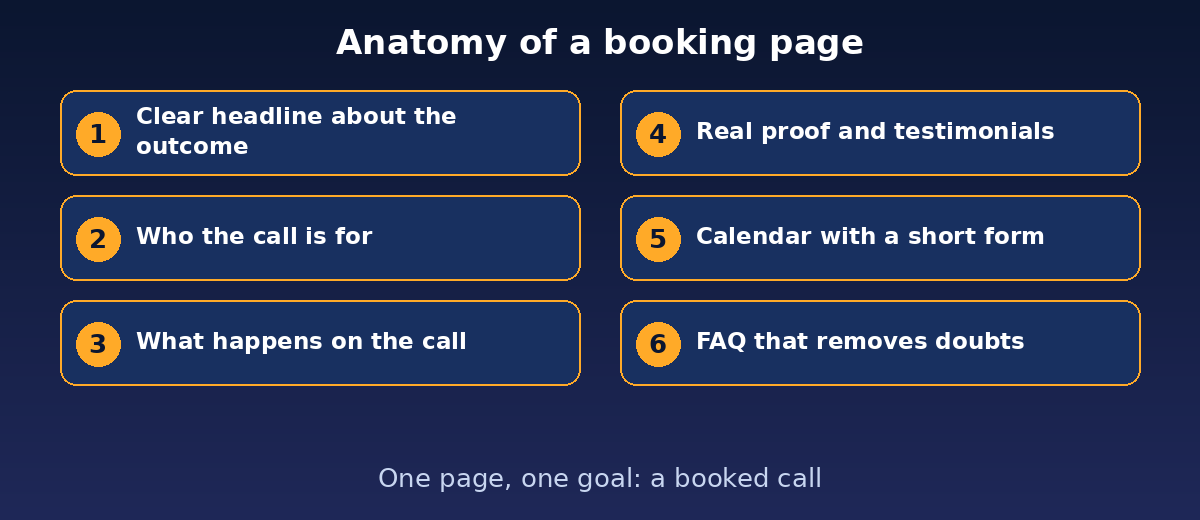
Six building blocks for a booking page that answers questions before visitors ask them.
1. A headline about the outcome
Lead with what the visitor gets from the call, not with the words "Book a call." For example, "Map your next 90 days of client acquisition in a free 30-minute call" is clearer than "Schedule a consultation." Be specific, and only promise what the call really delivers.
2. Who the call is for
A short list helps the right people self-select and gently filters out poor fits. For example: "This call is for coaches who already have an offer and want a more reliable way to get enquiries." You can add who it is not for, which saves time on both sides.
3. What happens on the call
Uncertainty stops people booking. Explain the format in three or four lines: how long it lasts, what you'll ask, what they'll leave with, and whether there is any obligation. If it is a sales conversation, say so honestly.
4. Proof
Add real testimonials, short case summaries, or logos of organisations you have worked with, as long as you have permission to use them. Don't invent or exaggerate results, and don't use placeholder reviews.
5. The calendar and a short form
Place the calendar high on the page so it is easy to find. Keep the form to the essentials. Name, email, and phone are usually enough, and perhaps one question about what they want help with.
6. An FAQ
Answer the questions that hold people back: cost of the call, how to prepare, what happens if they need to reschedule, and what you'll do with their information.
Setting Up the Calendar in GoHighLevel
The calendar settings affect how easy booking feels and how reliable it is. Review these before you publish:
- Availability: only offer times you can really do, in the right time zone.
- Call length and buffers: add a short buffer between calls so you aren't rushed.
- Notice period: set a minimum notice so nobody books ten minutes ahead unless you want that.
- Confirmation and reminders: turn on confirmations and reminders for every booking.
- Meeting link: make sure video call links are generated or included automatically.
Menu names in GoHighLevel change from time to time, so check the current labels in your account as you go.
Designing the Booking Form
Every extra field is another reason to leave. Ask only what you need to prepare for the call or decide whether it is a fit.
- Essential: name, email, and phone if you plan to text reminders.
- Helpful: one open question such as "What would you most like help with?"
- Often unnecessary: job title, company size, address, and long surveys.
If you use SMS reminders, include clear consent wording next to the phone field and link to your privacy policy. Rules vary by region, so check what applies to your customers.
Qualifying without scaring people off
If you need to filter leads, such as by budget or stage, use one or two questions and phrase them plainly. A long application suits high-ticket programmes, but it will reduce the number of bookings, so decide which matters more for your business.
Make It Work on Mobile
Many visitors will open your page on a phone. Check that the headline is readable without zooming, the calendar fits the screen, buttons are easy to tap, and the form doesn't require a lot of typing. Load the page on your own phone and try booking a test call.
What Happens After Someone Books
The booking page is only half the process. The moments after booking decide whether the person turns up.
- A thank-you page that confirms the time, explains what to prepare, and tells them where the meeting link is.
- An instant confirmation by email, and by text if they agreed to SMS.
- Reminders before the call, with a simple way to reschedule.
- A CRM update: the contact tagged, an opportunity created, and the source recorded.
Our GoHighLevel CRM setup guide shows how to structure the pipeline and tags behind this, and our automation guide covers the reminder and follow-up workflows.
Common Booking Page Mistakes
- Sending traffic to the homepage instead of a focused booking page.
- Too many options. Extra menus and links distract from the one action you want.
- No explanation of the call. People hesitate when they can't picture the conversation.
- Long forms. More fields usually means fewer bookings.
- Vague or fake proof. Weak or invented testimonials hurt trust.
- Not testing. A broken calendar or missing confirmation costs you leads silently.
How to Improve It Over Time
Once the page is live, review it every month or two. Look at how many visitors book, how many of those show up, and how many calls become clients. If few people book, the page or the traffic may be the issue. If many book but few attend, look at confirmations and reminders. Change one thing at a time so you know what made the difference. The funnel principles in our guide to building a funnel that follows up with every lead apply here too.
Frequently Asked Questions
Should I put the calendar on my homepage?
It's usually better to link from the homepage to a dedicated booking page, so the page can explain the call and stay focused on one action.
How long should a discovery call be?
Thirty minutes is common, but the right length depends on how you work. Choose a length you can keep to, and tell people what to expect.
Should the call be free?
Many coaches offer a free first call, but it's your decision. Whatever you choose, state it clearly on the page.
Do I need a separate page for each offer?
If your offers serve different people or problems, separate pages let you tailor the message. If you have a single offer, one page is enough.
Need Help Building Yours?
If you would like a booking page, calendar, and follow-up set up properly in GoHighLevel, you can book a free strategy call with Funnels by Zayyan, or see examples of our work.


