
Migrating to GoHighLevel: A Checklist for ClickFunnels, Kajabi and WordPress Users
Moving your business to a new platform can feel risky. You have live pages, a list of contacts, payments, automations, and traffic coming in every day, and the last thing you want is to break any of it. The good news is that a careful migration follows a predictable pattern, and most problems come from skipping steps rather than from the move itself.
This checklist is for people moving to GoHighLevel from tools such as ClickFunnels, Kajabi, or WordPress. Every platform is different and features change, so use it as a framework and confirm the specifics for your own setup.
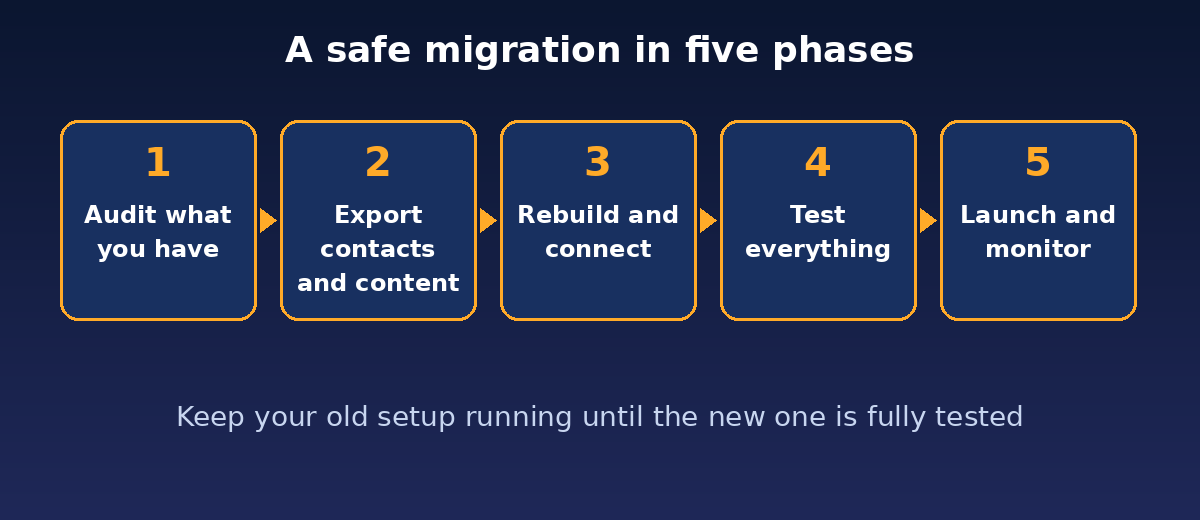
Five phases: audit, export, rebuild, test, then launch and monitor.
Before You Start: Should You Migrate at All?
Moving is worth considering if you pay for several tools that overlap, want your CRM, funnels, and follow-up in one place, or find your current setup hard to manage. It is less compelling if your current system works well and the main driver is curiosity about another tool. A migration costs time and attention, so be clear about what you want to gain.
Phase 1: Audit What You Have
Before moving anything, list everything your current setup does. Create a simple inventory:
- Pages: websites, funnels, landing pages, thank-you pages, and checkout pages
- Forms and surveys: where they sit and what they collect
- Contacts: how many, where they came from, tags or segments used
- Email and SMS: sequences, broadcasts, templates, and sending domains
- Automations: every rule that triggers actions
- Payments and products: processors, plans, subscriptions, and coupons
- Courses and memberships: content and member access, if you have them
- Integrations: calendars, ad accounts, accounting tools, and webhooks
- Tracking: analytics, pixels, and conversion tracking
- Domains: which domain points to what, and who controls the DNS
Then mark each item as keep, rebuild, simplify, or retire. Many people discover automations and pages they no longer need, and a migration is a good time to clear them out.
Phase 2: Export and Back Up
- Export your contacts to a CSV file, including tags, source, dates, and any custom fields. Check how your current platform handles unsubscribed and bounced contacts, and keep them marked so you don't email them again.
- Save copies of your pages and content: screenshots, text, images, and downloadable assets. Pages built in one builder generally can't be moved to another as-is, so plan on rebuilding them.
- Copy your email and SMS templates, subject lines, and sequences into a document.
- Export order and customer data where available, and record your products, prices, and billing details.
- Back up your domain settings, including DNS records.
Don't cancel anything yet. Keep your old setup running until the new one is fully tested.
Phase 3: Rebuild and Connect in GoHighLevel
Set up the structure first
Before importing contacts, build the structure that will hold them: custom fields, tags, and pipelines. This way, imported data lands in the right place. Our GoHighLevel CRM setup guide explains a clean way to organise them.
Import your contacts
Import the CSV and map each column to the correct field. Do a small test import first and check the result before importing everything. Apply tags so you can tell which contacts came from the old system, and keep unsubscribed contacts flagged as such.
Rebuild pages and funnels
Recreate your key pages first: your main website pages, booking page, lead magnet pages, and thank-you pages. This is a chance to improve them, not only copy them. Keep URLs the same where you can, or plan redirects for any that change, so you don't lose traffic or break links.
Rebuild your automations
Rebuild your most important workflows first, such as lead follow-up, appointment reminders, and payment emails. Our GoHighLevel automation guide covers the core workflows. Don't try to replicate every old rule. Start with what matters.
Connect payments, calendars, and integrations
Reconnect your payment processor, calendars, and any other tools. Test each connection with a small real or test transaction.
Set up email and SMS properly
Authenticate your sending domain so your emails are delivered reliably, and complete any registration needed for texting in your region. Our guide to SMS and email compliance covers the main points. If you are moving a large list to a new sending setup, consider ramping up volume gradually rather than sending to everyone at once.
Phase 4: Test Everything
- Submit every form with a test contact and check where the data lands.
- Book a test appointment and confirm the confirmation and reminders.
- Run a test purchase through any checkout flow.
- Check pages on desktop and mobile.
- Confirm tracking and analytics fire correctly.
- Check that all links work, including those in emails.
- Ask someone else to try it, since they will notice things you won't.
Phase 5: Launch and Monitor
Switch your domain carefully
Changing where a domain points is the moment your new setup goes live. Plan it for a quiet time, lower DNS record lifetimes beforehand if your provider allows it, and be ready to roll back. DNS changes can take time to take effect, so allow for a period of overlap.
Redirect old URLs
If any page addresses have changed, set up redirects so old links, bookmarks, and search results still lead somewhere useful.
Watch closely for the first few weeks
- Check new leads, bookings, and payments daily at first.
- Review email deliverability and any spam complaints.
- Look for error pages or broken forms.
- Collect feedback from your team and customers.
Only cancel your old subscriptions once you're confident everything works and you've kept the exports you need.
Platform-Specific Notes
- From ClickFunnels or similar funnel builders: funnels usually need to be rebuilt page by page. Pay attention to checkout flows, order bumps, and follow-up emails.
- From Kajabi or course platforms: membership content and member access need careful planning. Check how your members will log in and access content on the new system before you switch.
- From WordPress: decide whether to move the whole site or only some pages. Keep your URL structure and redirects in mind to protect search traffic.
Features and export options on all of these platforms change over time, so check their current documentation.
Common Migration Mistakes
- Cancelling the old system too early.
- Importing contacts before building fields and tags, then having to clean up afterwards.
- Re-subscribing people who had unsubscribed.
- Forgetting redirects, which breaks links and loses visitors.
- Skipping testing, especially on payments and reminders.
- Trying to copy everything exactly, instead of simplifying.
Frequently Asked Questions
How long does a migration take?
It depends on how much you have to move. A simple setup may take days, while one with courses, many funnels, and complex automations takes longer. Build in time for testing.
Can I migrate in stages?
Yes. Many people move their CRM and follow-up first, then pages, then payments. A staged approach reduces risk, as long as you keep track of what lives where.
Will I lose my search rankings?
Rankings can change after any website move. Keeping URLs the same, setting up redirects, and preserving content helps protect them.
Should I hire someone to do it?
If your setup is complex, or the cost of mistakes is high, expert help can be worthwhile. Our checklist for choosing a GoHighLevel expert can help you evaluate candidates.
Need Help With Your Migration?
If you would like help planning or carrying out a move to GoHighLevel, you can book a free strategy call with Funnels by Zayyan, or see examples of our work.


