
Coaching Website Pages You Actually Need: A Page-by-Page Guide
A coaching website doesn't need fifty pages. It needs a handful of clear ones that each do a specific job: explain what you offer, build trust, and lead the visitor to a single next step. Too many coaches either build a one-page site that answers nothing or a sprawling one that confuses everyone.
This guide walks through the pages a coaching or consulting website needs, what each should contain, and how they connect to booking and follow-up. It applies whether you build on GoHighLevel, WordPress, or another platform.
Start With the Goal of the Website
Decide what the site must achieve. For most coaches the answer is simple: get the right people to book a discovery call or join your email list. Every page should support that goal, directly or by building trust along the way.
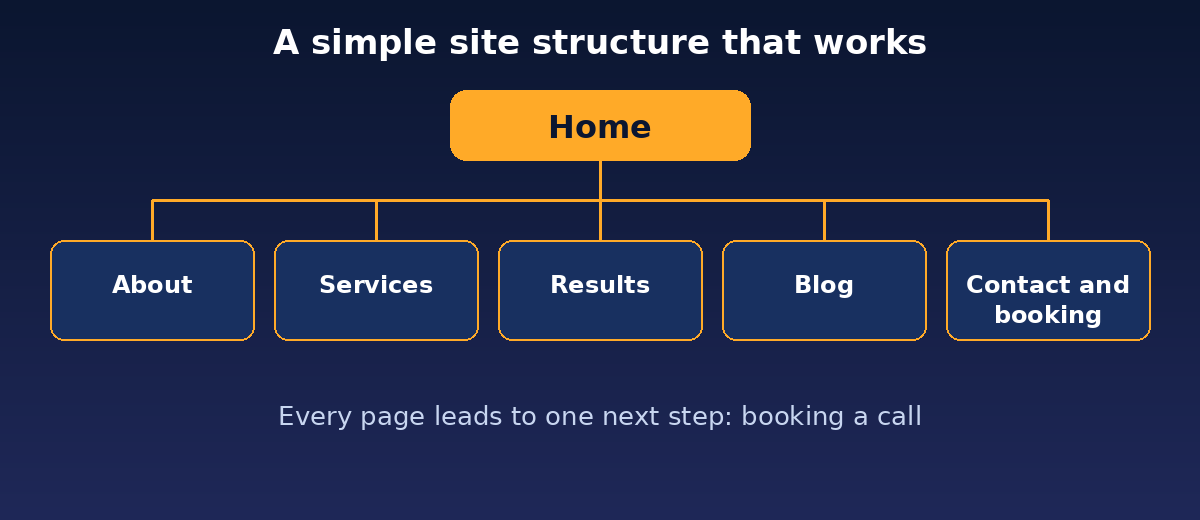
A simple structure: a home page that points to five supporting pages, all leading to booking.
Page 1: Home
The home page has about five seconds to answer three questions: what do you do, who is it for, and what should I do next?
- A clear headline naming the result you help people reach and who you help.
- A short supporting line explaining how.
- One main button, usually "Book a call."
- Proof such as testimonials or recognisable clients, if you have permission to show them.
- A brief overview of your services, linking to the full page.
Page 2: About
People hire coaches they trust, so this is often one of the most visited pages. Resist writing a full biography. Focus on why you do this work, relevant experience, and what it is like to work with you. Include a real photo, and end with a call to action.
Page 3: Services or Programmes
Explain what you offer in plain language: who each programme is for, what is included, how it works, and what the next step is. If you have several offers, give each a short section or its own page. Pricing is your choice, but if you don't show it, explain how people can find out.
Page 4: Results or Case Studies
This page turns claims into evidence. Use real client stories with context: the starting point, what you did together, and what changed. Only publish results you can support and have permission to share. If you are new and have few clients, use detailed testimonials or describe your process instead of inventing proof.
Page 5: Blog or Resources
A blog helps people find you through search and shows how you think. It doesn't need frequent posts to be useful. A small set of strong articles answering the questions your clients ask can work harder than a long list of thin ones. Link each article to a next step. Our guide to lead generation for coaches explains how content fits with other channels.
Page 6: Contact and Booking
Make it easy to take the next step. A dedicated booking page explains what happens on a call and has the calendar ready. See our guide to building a discovery call booking page that converts for details. A simple contact form is useful too for people who prefer to write first.
Supporting Pages You Shouldn't Skip
- Privacy policy: required in many regions, and important if you collect emails, use cookies, or send texts.
- Terms and conditions: especially if you sell programmes or digital products.
- Thank-you pages: confirm bookings and sign-ups, and tell visitors what happens next.
- A custom 404 page: helps visitors who land on a broken link find their way back.
Pages You Probably Don't Need Yet
- Separate pages for every tiny service
- A long "Our Team" page for a solo practice
- Multiple home-style landing pages with overlapping messages
- An online shop, unless you really sell products
You can always add pages later. It is easier to expand a clear site than to tidy a cluttered one.
Design and Content Basics That Matter
- Mobile first: check every page on a phone.
- Speed: compress images and avoid heavy effects.
- Readable text: short paragraphs, descriptive headings, and enough contrast.
- One main action per page: too many buttons dilute the message.
- Real images: your own photos usually build more trust than generic stock.
Connect the Website to Your CRM and Follow-Up
A website that collects enquiries but doesn't follow up wastes effort. Connect your forms and calendar to a CRM so every enquiry creates a contact, is tagged with its source, and starts a sensible follow-up. Our GoHighLevel CRM setup guide explains how to organise pipelines and tags behind the scenes.
Basic SEO for a Coaching Website
- Give each page a unique title and description.
- Use one clear H1 per page, with descriptive subheadings.
- Write alt text for meaningful images.
- Link related pages to each other.
- Mention your location or niche if it genuinely applies.
A Simple Launch Checklist
- Home, About, Services, Contact or Booking pages are complete
- Privacy policy and terms are published
- Forms and calendar tested from a phone
- Confirmation emails arrive and look right
- Page titles and descriptions are written
- No placeholder text or images remain
Frequently Asked Questions
How many pages should a coaching website have?
Many work well with five to eight core pages. Add more only when you have a clear reason.
Do I need a blog?
Not necessarily, but it helps if you want to be found through search. A few thoughtful articles are better than many weak ones.
Should I use a template or a custom design?
A good template is fine for most coaches, provided you replace placeholder content and adapt it to your message. Custom design makes sense when you have specific needs or a larger budget.
Can I build my website in GoHighLevel?
Yes, GoHighLevel includes a website and funnel builder, which keeps your pages, forms, calendar, and CRM in one place.
Need Help Building Your Website?
If you would like a coaching website built around booking and follow-up, you can book a free strategy call with Funnels by Zayyan, or browse our recent projects.


