
How to Reduce No-Shows With GoHighLevel Appointment Reminders
You get a booking, prepare for the call, join on time, and wait. Nobody shows up. For coaches, consultants, and service businesses, no-shows waste time and make the calendar look busier than it really is. You can't eliminate them, but a clear reminder sequence makes a noticeable difference for many businesses.
This guide explains how to build an appointment reminder sequence in GoHighLevel, what to write, when to send it, and how to follow up when someone still doesn't show.
Why People Miss Appointments
Most no-shows aren't dramatic. People forget, get busy, mix up the time zone, lose the meeting link, or quietly decide they don't need the call any more. Reminders help with the first four, and a good booking process helps with the last. If a prospect booked on impulse and doesn't remember why, a reminder that restates the value of the call can help too.
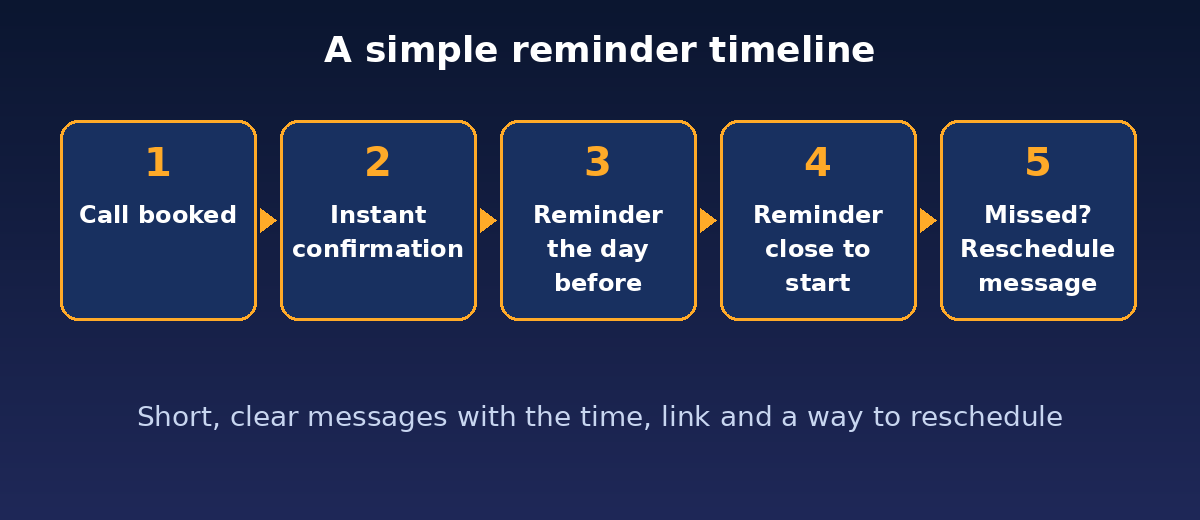
A simple timeline: confirm instantly, remind twice, and follow up quickly if they miss.
The Building Blocks of a Reminder Sequence
1. An instant confirmation
As soon as someone books, send a confirmation by email, and by text if they agreed to SMS. Include the date, time, time zone, meeting link or location, and a way to reschedule. This reassures people the booking worked and gives them something to find later.
2. A reminder the day before
A short message the day before gives people time to adjust their schedule. Repeat the time, the link, and what to prepare. This is also a good moment to restate what they will get from the call.
3. A reminder close to the start time
A brief message shortly before the appointment catches people who forgot or are about to be late. Keep it to a line or two with the link front and centre.
4. A no-show follow-up
If someone misses the call, send a friendly message soon afterwards offering to reschedule. Avoid blame. Many people are embarrassed and respond well to an easy way to rebook.
Example Messages You Can Adapt
Confirmation (email or SMS): "Hi [First Name], you're booked with [Business Name] on [Date] at [Time] ([Time Zone]). Join here: [link]. Need to change it? Reschedule here: [link]."
Day-before reminder: "Hi [First Name], a quick reminder about our call tomorrow at [Time]. Link: [link]. If anything has changed, you can reschedule here: [link]."
Close-to-start reminder: "Hi [First Name], we're starting soon at [Time]. Here's your link: [link]. See you shortly!"
No-show follow-up: "Hi [First Name], we missed you today. No problem at all. You can pick a new time here: [link]. Reply if you have any questions."
If you send texts, include your business name and opt-out wording where required, such as "Reply STOP to opt out."
Choose the Right Channel
- Email suits confirmations and details, but it can be overlooked.
- SMS is quick and noticeable, but it needs clear consent and sensible frequency.
- A mix is often the best option: email for the full details, SMS for short nudges.
If you rely on SMS, check the consent and registration rules that apply in your region before you switch it on.
How to Build It in GoHighLevel
In GoHighLevel, reminders are usually built as a workflow that starts when an appointment is booked. The general approach:
- Create the trigger: the workflow starts when a contact books on your calendar.
- Add the confirmation: send an email and, if appropriate, an SMS straight away.
- Add waits and reminders: use wait steps tied to the appointment time so reminders go out before it, not just after booking.
- Handle changes: make sure rescheduled or cancelled appointments stop the old reminders and start new ones.
- Add the no-show path: when an appointment is marked as a no-show, send your follow-up and tag the contact.
Menu names and workflow options change from time to time, so check the current labels in your account. Our GoHighLevel automation guide shows how the core workflows fit together, and our CRM setup guide covers the tags and pipeline stages they rely on.
Make the Call Worth Showing Up For
Reminders work best when the person still sees a reason to attend. Alongside the reminders:
- Explain on the booking page what the call covers, as described in our guide to a discovery call booking page that converts.
- Ask for one small preparation step, such as writing down their top question.
- Keep the gap between booking and the call reasonable. The longer the wait, the more likely people are to forget.
Test the Sequence
- Book a test appointment with your own email and phone number.
- Check that the confirmation arrives instantly and the details are correct.
- Confirm reminders send at the right times, in the right time zone.
- Reschedule the test appointment and confirm the old reminders stop.
- Mark it as a no-show and check the follow-up fires.
Common Mistakes
- Too many reminders. Two or three is usually enough; more can feel pushy.
- Time zone confusion. Always state the time zone, and test with a different one.
- Forgetting the link. Every reminder should make it easy to join or reschedule.
- Not handling reschedules. Old reminders firing after a change confuse people.
- No no-show follow-up. A quick, kind message recovers some missed bookings.
Frequently Asked Questions
How many reminders should I send?
Many businesses use a confirmation and two reminders. Adjust based on how your clients respond and avoid overloading them.
Should I charge for no-shows?
That depends on your business and market. If you do, state the policy clearly when booking.
Can I use WhatsApp or other channels?
Possibly, depending on how your account and region are set up. Check what your account supports and the consent rules for each channel.
Will reminders eliminate no-shows?
No, but they can reduce them. Combine them with a clear booking page and a prompt follow-up for the best results.
Need Help Setting Up Your Reminders?
If you would like a reminder and follow-up system built properly in your GoHighLevel account, you can book a free strategy call with Funnels by Zayyan, or see examples of our work.


